Thursday, April 18, 2013

The Newest Project

So, it's been a while! I've take some time off to recover from the amount of time spent developing the last game, then began with a new concept and reworking the event and text engines from the ground up.

About the project - I can't give away much yet.
  • A much larger single level, driving an adventure style mystery. At least a few dozen NPCs, a dozen different landmarks, and multiple story paths to completion.
  • The first of a three part series, with a target play-through time of 6-10 hours per episode.
To prepare for this, I've begun the following:
  • Begun working with an actual graphics artist:
  • Utilizing the newest Nine and Bepu sources for improved graphics and physics
  • Created a powerful 3rd person camera extension tied to the the physics engine
  • Rewritten the entire "event" system which drives changing game states, text events, level loading, and player interactions
    • There is still a lot to do on this front
  • Started the first portions of user options inside of text screens, so that users can select different behaviour.
  • Cleaned and reorganized the base framework used to create a game
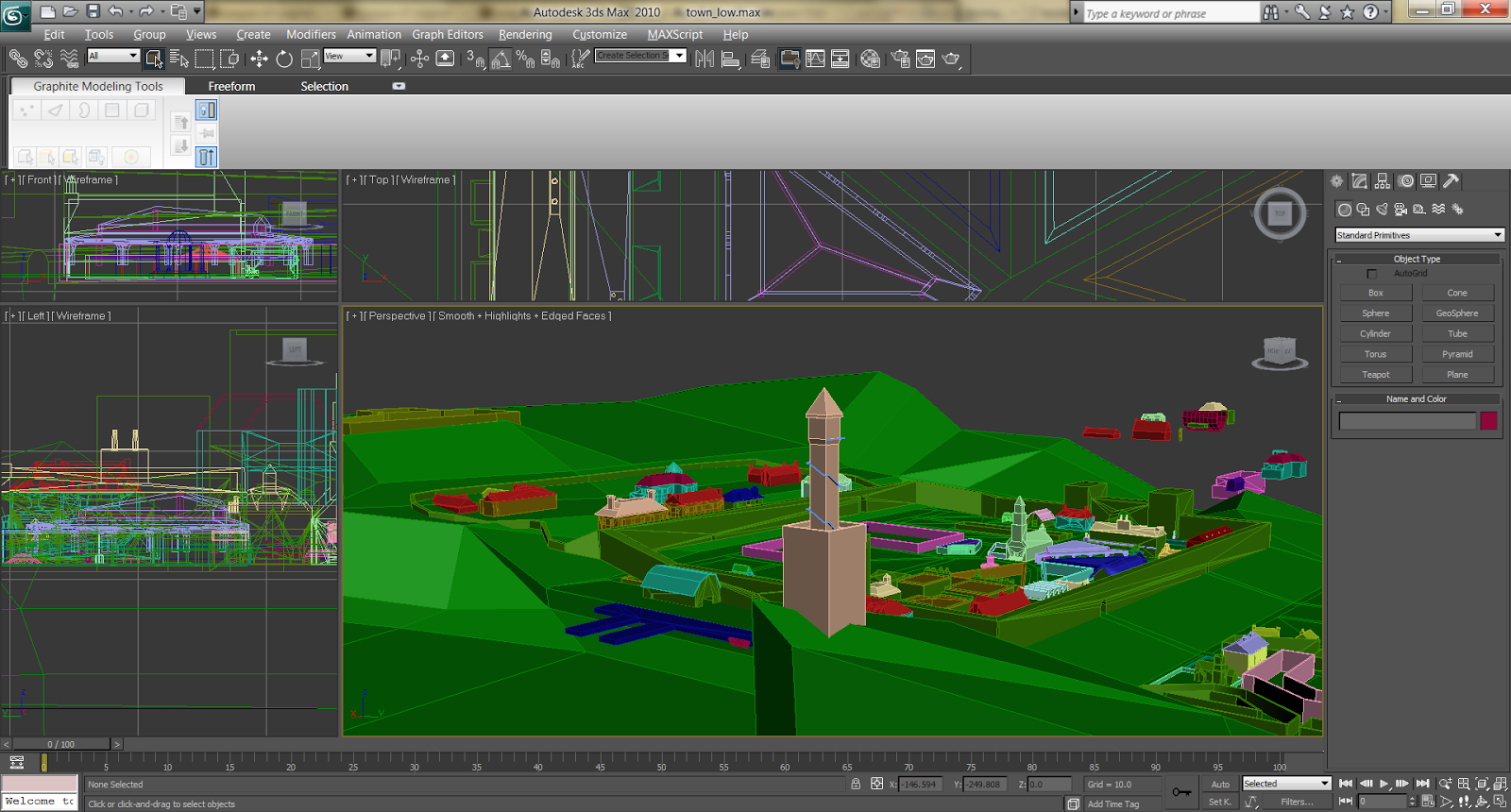
I'll try to keep some updates going in the future, but here are some teaser shots of the concept work:

Overview of the basic bounding models for the level


Closer up of some of the bound models


The new text editor for driving on-screen text and user options


First in game shot of the user option interface


More soon! Let me know any feedback :)

James

Thursday, October 25, 2012

Murder for Dinner Post Mortem

In late summer this year, I finished my latest project - an interactive murder story, a "whodunit". It was my first attempt at creating a story based engine and my first attempt at working with family members for any large project - my mom wrote the story and my sister did the character models. It was a monstrously complex project at first - I created a level editor, learned how to animate, struggled with multithreading and sound. It was a lot - A LOT - of work.

I'm content with the result, but in retrospect, there are a million things about gameplay, game design, and story telling to take to the next project.

GOOD STUFF
  1. Learning how to tell a compelling story - it's not as simple or intuitive as it may seem. I asked my mom if she'd be interested in getting involved - she's well read, has written before, and has a great knack for this kinds of puzzlers. I agreed to help her along in making the conversion to a video game story. It turns out, I had no idea how to tell an interactive tale :) So why is this in the "Good Stuff" category? Because I'm proud of the tale she came up with - the interesting characters, the quality backstories, and the tight, twisty flow of the story. I'm not proud of how it was conveyed in game, but that's my responsibility - I've learned how to balance it, how much more interactive is needed, how much side information is necessary to give a living feel to the world. And let me tell you: it is tons.
  2. The level editor and engine. I started with the Nine engine for graphics and Bepu for physics - both wonderful open source products. While Nine started wonderfully, it ended up being stripped near the end due to complications (I intend to revisit it, thanks to their continued work on it and really solid design); Bepu almost was taken out due to issues I had with my implementation of the character model, but remained and has been wonderful since.The level editor contains a text management screen, animation cues, a simple scene graph, distinct bound and drawing models, event triggers such as text/animation/level loading/sound/gamestate/etc. It's undergoing many revisions, but has been a great foundation.
  3. Learning more about the restrictions in pushing pixels to the screen (for me at least). I learned what a good low poly model can be, how a normal map is made (even if they never made it in), how to animate models, how to do complicated multimaterial maps, and so much more. It's been great use in knocking out samples for the next project.
BAD STUFF
  1. Sales. This was my fault - I tried to price it at 240 points initially, thinking that the amount of work I put into it directly correlated to the value of the prodct. Sadly, as the graph at the bottom shows, until I changed it to 80 points, it sold horribly. Really horribly. In the Microsoft Indie world, the first week is the far and away the most valuable and I blew it with an overpriced game. 
  2. Reviews. Well, mostly one review - that was the first one out and I'll be honest, after almost a year of work and testing, it kind of crushed me. It was a good, honest review, if blunt, and I appreciate it, but it was a pill to swallow. Other reviews have been kinder, and that's been a bit of a help, but I was looking to really create a game that people would love and realizing how tough it can be - and then hearing it - was a blow.
  3. Sounds. While Zach Parrish's music has continued to be incredible, not only did a teeny sound bank affect the final result, but it also was and still is a nightmare of code glitches.
  4. Animations - too few, too simple. This was due to my time restrictions and trying to do it all on my own (anyone interested in doing graphics work for the next game? Let me know!). It was mostly do to my needing to keep characters mostly stationary, but it dried out the already still game world.
  5. Converting solid source material to a game - making a good short story into a video game needs a LOT more massaging, tweaking, content, and vibrancy than I was aware of.
OVERALL
I'm glad the final product was done, and that some folks seem to genuinely enjoy it. There is a lot to improve upon in the storytelling department, from the environment to the dialogue, but that's for next time!

I'm working on concepts for the next one - another story, another world, and hopefully better :) If you've had a good or bad experience with it, let me know! I'd love your feedback.

Below: the initial version of the level editor, showing object bounding boxes.

Below: sales. Notice the strong drop in the two weeks at 240 points, losing the best time on the market (the first week). Once dropped to 80 points, sales jumped.


Thursday, March 8, 2012

Masters of Influence Post Mortem (and current project)

One of the hardest parts at the end of this project was coming up with the name. It may seem trivial, but it's an indicator something that I'm still in the process of learning: understand completely what you are trying to do before you begin it. There are of course ups and downs, and a million little things to pick out and understand as the project goes ahead, but I spent so much time trying to make my game match my engine as much as the other way around that it was twice as hard as it could be.

But really? I'm very happy with the product.

GOOD STUFF
1) It looks fun, plays well and is entertaining. Designed from scratch with a modified version of Catan in mind, I think it turned out well.

2) Music. What a difference that makes. While I left it off in the chess game because it was important to me that the person could concentrate, making it available if the user desires is a pretty good thing.
3) Designing and doing my own artwork - exhausting to learn, and massively time consuming, but it turned out well. The last several years of tooling around for the very basics in 3DS Max came home to roost and help out.
4) Quick, large scale, and simple AI. Using the board-copy A* procedure from the chess game was infeasible for some of the size boards I used. Therefore, I used a simple board analysis with weights associated to current and desired possessions. Quick, simple and sort of effective.

BAD STUFF
1) Knowing what I was trying to accomplish. It started as a mix of Catan and Civilization, then became Stratego, then back to Catan, and so on. All during engine development. It adds to the stress, it adds to the overhead, and it detracts from the final experience. Get down, in design documents, WHAT YOU WANT TO DO.
2) No save games and no multiplayer. By the time I started learning about online play, it was too late for my game to be modified to fit - I tried, trust me, but I don't have an internet connection and actually travel to test on the XBox, so after making a few attempts to bring it online, I gave up. Same with save games. I'm glad to announce I've created working online demos and my current project uses a very sophisticated save game system, but this game could have truly benefited from it.
3) The AI could have been improved. As it stands, it's a moderate challenge, especially on smaller boards, but there could have been a better analysis.
4) Don't release the weekend Skyrim/Zelda/Mario are released, right after BF3 and MW3...

OVERALL
It was close to what I wanted, a good technical challenge (such as PCF shading with instanced geometry and patch updating the tile statuses), but I wish it were more deep and complex. That's part of the challenge of being a solo developer - big time games take bigger teams.

SALES
(that's right, 1000 :) )

I'll give some details on that engine soon, as well as screenshots and details of my current project - it's a first person mystery, taking place in a single Victorian house!

Thursday, August 25, 2011

HexChess 360: Post Mortem

Well, that was fun! When I was trying to write my first game for publication, I couldn't come up with a solid, saleable idea that was simple enough to implement - so I took chess! A finished ruleset, a concept people are at least familiar with, it seemed a good idea and I am happy with the results. The code in previous posts is nowhere near what I ended up with, but moving forward, this will be more up to date!

HexChess 360

GOOD STUFF
1) A game, from start to finish, is a lot more work than one would think - from modeling and texturing, to managing input, to AI research and implemenation, to the menus and options.But doing it all was a ton of fun and a great learning experience.
2) I really got to understand the nitty-gritty of MinMax and AB pruning - boy, did I ever, and the learning curve dropoff from impossible to easy is astounding.
3) I learned TONS of optimization tricks, from 1D array usage, to internals, to garbage collection and  function management. Lots of this will come in handy in the future.
4) I learned a new game and had fun :)

BAD STUFF
1) It took a lot of time to get this far, and a lot out of me to have to work every evening on every aspect of the game. Next time, I'm going to try to space out the work with some other people.
2) There were a lot of  kinks to manage when moving from a PC to the XBox - how to handle user input, how much slower the XBox processor is (expecially with memory restrictions of my AB searching) compared to an i7, how to handle user elements within the 10% screen restrictions... these need to be considered from the START and a lot of it comes with experience.

OVERALL
 A great project and a great time. Obviously tough at some times, but a product that at least 540 people have liked enough to spend 80 points on. There have been some complaints about the user input (understandable), the AI search time (restricted as best I could) and the lack of music (which was purposefully left out, as I thought a chess game could use some silence), but overall, a good rating on XBL Indies.

Sales:


My next project, another board game, is underway now and has been for a few weeks. New updates soon!

Thursday, March 31, 2011

The Chess Pieces and Tiles

Bear with me as I work backwards in creating the board - this whole "documentation" thing sometimes is difficult.

The board is composed of tiles, each of which is a class. The most important parts of each tile are as follows:

   1:  public class Tile
   2:  {
   3:      public File file;
   4:      public Rank rank;
   5:      public ChessPiece piece;
   6:      public Tile[] neighbors;

If a tile does not have a piece on it, the piece variable is null; likewise, if a piece is a border tile, the entry for it's neighbor (of 6 possible) is null - this tells us when a piece is an edge tile.

Pieces are likewise classes, and their most important parts are as follows:

   1:  public class ChessPiece
   2:  {
   3:      public PieceType type;
   4:      public PieceColor side;
   5:      public Tile tile;
   6:      public bool Alive;
   7:      public bool WasMoved;
   8:      public bool WasOnStartingTile;
   9:      public List<Tile> MoveableTiles = new List<Tile>();
  10:      public List<Tile> AttackableTiles = new List<Tile>();
 
Besides the obvious components, "WasMoved" is used to determine if the piece has moved (castling) and "WasOnStartingTile" is used for pawns, to determine if they can be attacked en passant. The lists are updated to determine where a piece can move or attack from its current position.

Movements shall be covered next!

Tuesday, March 29, 2011

Introduction to the game: Hexagonal Chess

My first project began over a year ago, around the start of the 2010 year, developing a hex based 3D engine. After a few months of work, development was set aside to wrap up a graduate degree and upon completion, a smaller, more manageable project was undertaken in February of this year: Hexagonal Chess. This is a running development blog, hopefully complete by the DreamBuildPlay submission deadline.

Without any prior experience with hex chess, and not tons with regular chess anyways, in retrospect, I would not have started developing three versions at the start. But I did: Glinski, McCooey and Shafran. Shafran's version proved to be the biggest issue, thanks to the different board size, file/rank determination and extra moves such as castling.

Board Components

   1:          private GameVariant variant;
   2:          public GameVariant Variant
   3:          {
   4:              get { return variant; }
   5:          }
   6:          private Tile[,] tiles;          // Exist in FileRank format. Can be accessed: Tile t = tiles[(int)File.F, (int)Rank.Eleven];
   7:          public Tile[,] Tiles
   8:          {
   9:              get { return tiles; }
  10:          }
  11:          public Player[] players;
  12:   
  13:          private PieceColor CurrentTurn = PieceColor.White;
  14:   
  15:          public List<ChessPiece> WhitePieces = new List<ChessPiece>();
  16:          public List<ChessPiece> BlackPieces = new List<ChessPiece>();
  17:          public ChessPiece WhiteKing;
  18:          public ChessPiece BlackKing;
  19:   

The king pieces are given a shortcut, for quick referencing.

Creating the tiles and positions
The tiles are held in a two dimensional array, with extra spaces just held as null. For Glinsky and McCooey, the tiles are placed in a similar fashion:

   1:              // Assign tiles to the array, incrementing Rank then File into FileRank format
   2:              // We have 11 files and 11 ranks
   3:              for (int i = 0; i < 11; i++)
   4:              {
   5:                  // If our ranks are ranged 1 - 6, inclusive...
   6:                  if (i < 6)
   7:                  {
   8:                      // then we have 11 files
   9:                      for (int j = 0; j < 11; j++)
  10:                      {
  11:                          tiles[j, i] = new Tile((File)j, (Rank)i, null);
  12:                      }
  13:                  }
 
As we get to the "top" or black side of the board, we iterate towards the middle, leaving us with a much longer function.
Shafran has a special, and much easier to create, tile layout:


   1:              // Assign tiles to the array, File then Rank
   2:              // We have 9 files and 10 ranks, starting with files first.
   3:              // Construct the first 5 files (A - E inclusive) with all their ranks (increasing to 10 max)...
   4:              for (int i = 0; i < 5; i++)
   5:              {
   6:                  for (int j = 0; j < 6 + i; j++)
   7:                  {
   8:                      tiles[i, j] = new Tile((File)i, (Rank)j, null);
   9:                  }
  10:              }

We then continue in like manner to finish the rest of the tiles.

Placing the pieces
Placing the pieces at this point is easy. Since we've created the tile array to be addressable by file and rank for each version, we can simply:


   1:  tiles[(int)File.G, (int)Rank.Ten].piece = new ChessPiece(PieceType.King, PieceColor.Black, ref tiles[(int)File.G, (int)Rank.Ten], false, false, true, false, false, false);

Why did I use classes?
Each tile is a class, and each piece is a class - a piece points to a tile points to a piece, ad nauseum. Initially, this was done simply because it was easier. Structs, as value types, would not be as easy to compare as classes, requiring rank and file checks for each check of a piece or tile. This also generated some concern looking forward to the AI (not yet even begun) when considering the size of the heap when looking forward in multiple plys, but it was assuaged somewhat by looking through MSDN documentation on structs and recommending that structs are used in the majority of times for types less than 16 bytes; my classes were larger than that, with their position in space, type, available moves, etc.

If the performance is terrible, I may consider removing the chess piece class entirely, and simply having the tile class with chess piece type and side. This, however, would be a very time consuming change.